
Projects & inspiration overview References Project configurator Photo montage Construction tips
Products overview Roof systems Façade systems Roof drainage Solar panel systems Flood protection solutions Coils and metal sheets
Resources overview Project configurator Photo montage Order brochures Request a guarantee certificate Trade fairs Questions and answers Your PREFA contact For installers For architects
Benefits overview Building material aluminium Special topics
Company overview About us Job offers News Press
Contact overview Your PREFA contact Contact form Order brochures
References overview Case studies Architecture Highlights Renovation Gallery
Construction tips overview Roof renovation Facade design Wood & Aluminium Façades Coverings for every roof shape Lightweight metal roof
For installers overview My PREFA Login Academy Advertising Material, logos & product samples Instruction and demonstration videos
For architects overview Experience PREFARENZEN Order our architectural brochure and architect folder Download centre BIM
Building material aluminium overview 40-Year guarantee Sustainability Complete System Storm-proof
Special topics overview Fire protection Listed buildings
About us overview Facts and figures Our values and goals Sustainability
In order to determine a right angle, use an aspect ratio of 3: 4 5.
Note
Correct and precise layout is the best prerequisite for quick and neat installation.
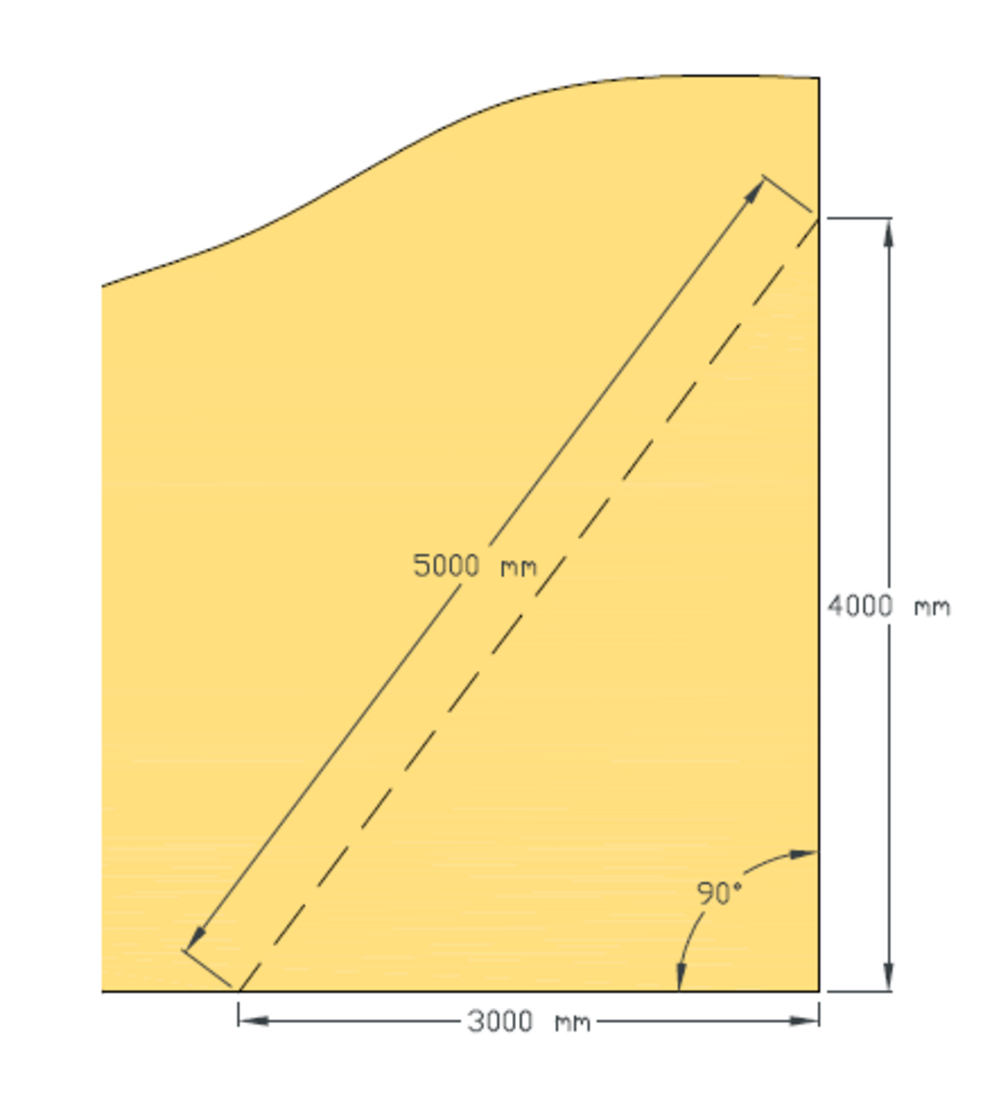
Mark the desired corner point and then mark out a length of 3 m on the edge to which you want to determine the right angle. Then mark 4 m from the corner point in the approximate direction of the right angle. Now hold the zero point of the tape measures at the previously marked 3 m mark and measure 5 m from this point. The right angle from the corner point can be found at the intersection. This not only works with the dimensions 3, 4 and 5 m, but with any multiple or fraction of these dimensions. Only the ratio 3: 4 5 must be kept.
You can only download content from one product category. If you require content from multiple categories, please create a separate download for each product area.